

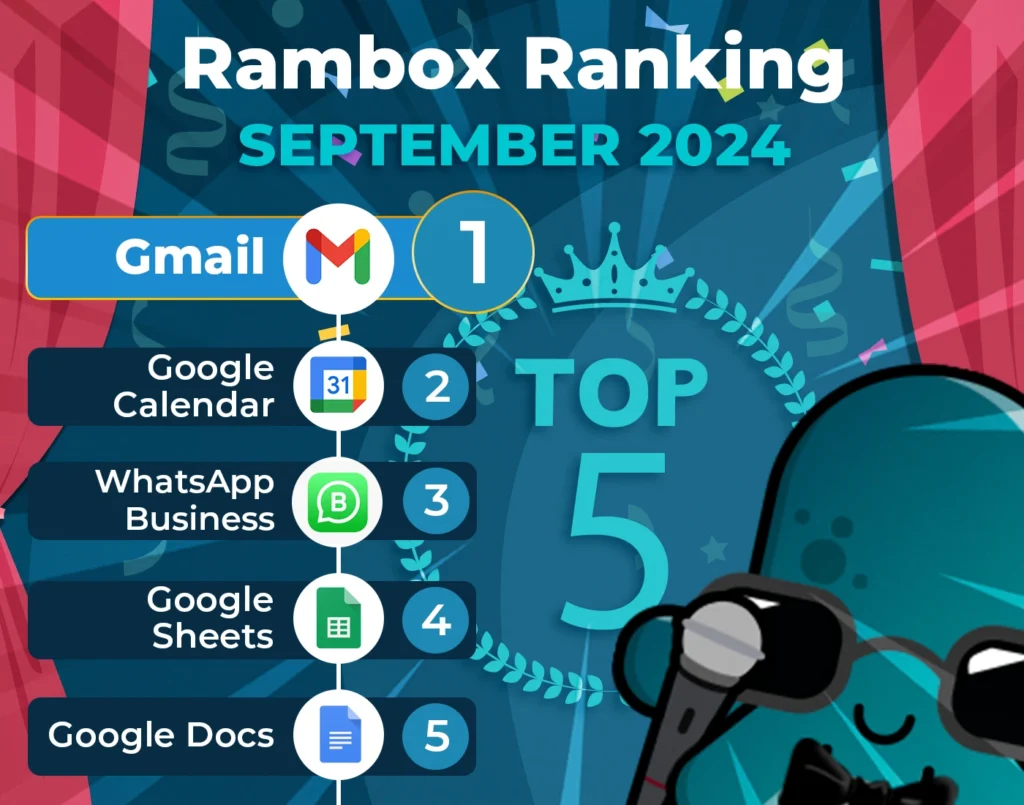
It’s time to unveil the power-packed lineup of September’s most-used apps on Workspace Hub – your favorite workspace simplifier.
Join us on this exploration, where we first dive into the top 15 most-used apps. Here, we’ll unearth a mix of personal and professional digital applications that are the pillars of our users’ digital workspaces.
But our journey doesn’t end there. Let’s take a closer look at how the Workspace Hub Ranking has evolved since last month, August.
Discover the latest trends and shifts in user preferences as we spotlight the newcomers who have made their mark in the top ranks and reveal our users’ new favorite apps.
Most-used apps on Workspace Hub in September
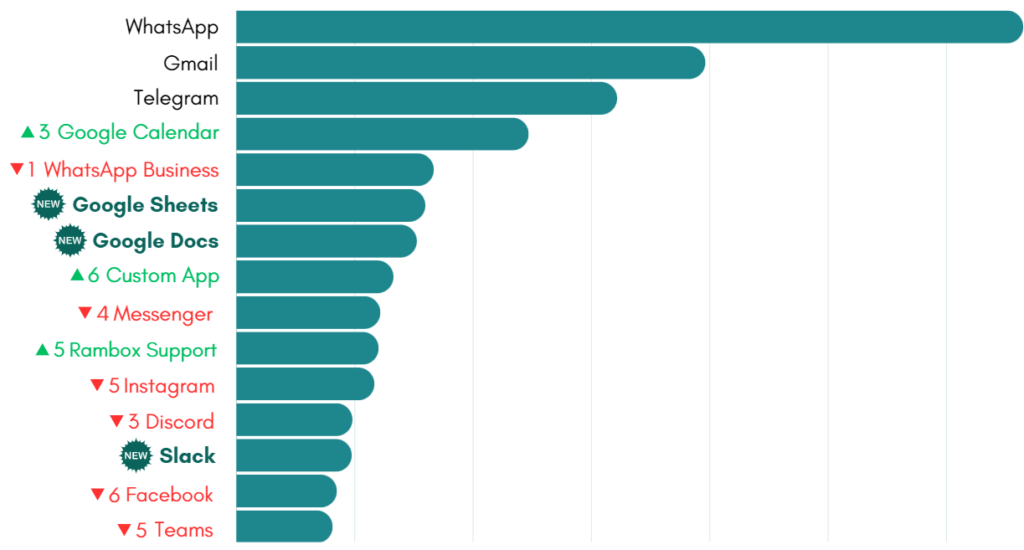
First, we present the top 15 apps most used by Workspace Hub users based on statistical and impersonal data.
This selection represents the digital frontrunners that have captured the spotlight in the diverse digital realms of our users.
How has the Workspace Hub Ranking changed in the last month?
This month, the Workspace Hub ranking has brought some exciting changes that users will definitely want to know about! WhatsApp keeps its crown as the most popular app, sticking to its top spot with no surprises. Gmail continues to shine in second place, while Telegram holds strong in third.
A cool trend is the rise of Google’s office suite. Google Calendar has jumped to fourth place, and we’re thrilled to see Google Sheets and Google Docs join the party at sixth and seventh, respectively. It looks like Workspace Hub users love these tools for their daily organization and tasks!
On the other hand, the social media scene has faced some challenges this month. Instagram has really felt the decline, slipping down to the eleventh, while Facebook now sits at the fourteenth. Users seem to focus more on productivity than scrolling through social feeds.
As for communication apps, WhatsApp Business has dropped to fifth place, and Messenger now occupies the ninth spot. Despite these shifts, it’s clear that these tools are still valuable for user interactions.
In brighter news, Custom Apps have made a nice leap to eighth place, showing that many users enjoy customizing their Workspace Hub experience. Workspace Hub Support has also gained some love, moving up to tenth place, proving it’s a helpful user resource.
Now, let’s talk about Slack! It’s making its debut in thirteenth place, and what’s more, it has dethroned Teams as the go-to app for collaboration. If you’re curious about which app might be better for your needs, check out our complete review of Slack vs. Teams.
Overall, this month’s ranking shifts show a clear trend toward productivity and effective communication.
A Productivity Shift: Google Tools Take Over
This month, Google tools are really making waves among Workspace Hub users! Google Calendar has quickly become the go-to app for organizing tasks, meetings, and deadlines.
It’s also interesting that Google’s Office Suite seems to be outshining Microsoft Office in popularity. Let’s take a closer look at what each of these handy apps offers.
Google Calendar
Google Calendar is a fantastic tool for managing your schedule. Its easy-to-use design lets you quickly create events, set reminders, and share your calendar with friends or colleagues. One of its coolest features is how it integrates with other Google services, like Gmail and Google Meet, letting you jump into video calls right from your calendar.
Plus, you can personalize your calendar by color-coding events or creating separate calendars for work and personal life. But we know that one app isn’t perfect for everyone, so if Google Calendar isn’t your thing, check out our list of the best Google Calendar alternatives.
Google Sheets
Google Sheets is a great tool for organizing data. One of its standout features is real-time collaboration, which means you and your teammates can work on the same sheet simultaneously. This is especially useful for planning projects or tracking information without the hassle of sending files back and forth.
Plus, Google Sheets has useful tools for creating charts and graphs, helping you present your data clearly. It’s straightforward enough that even beginners can quickly get the hang of it.
Google Docs
Google Docs is perfect for writing and collaborating with others. It allows multiple people to edit a document simultaneously, which is great for group projects. You can leave comments and suggestions, making it easy to share feedback without changing the original content.
The best part? You can access Google Docs from any device with internet access, so you can work on your documents wherever you are. It also has simple formatting options and templates to help you create various types of documents quickly.
Teamwork Apps on the Rise
This month, even though teamwork apps are a bit lower in the ranking due to the impressive rise of Google tools, collaboration remains essential for Workspace Hub users. Two apps stand out in this area: Slack and Microsoft Teams.
Slack is perfect for real-time communication and shines when organizing discussions on different topics through different channels. One of its great features is the ability to collaborate with external users via guest access, which makes it easy to bring clients or freelancers into your conversations.
On the other hand, Microsoft Teams is ideal for those who already use Microsoft products. It combines messaging, video calls, and file sharing all in one place. Plus, Teams is better suited for larger groups, making it a solid choice if you’re part of a big company that needs to collaborate efficiently.
Why use these apps in Workspace Hub?
Workspace Hub is the ideal tool for managing communication and collaboration apps, keeping you informed about messages and project updates without feeling overwhelmed.
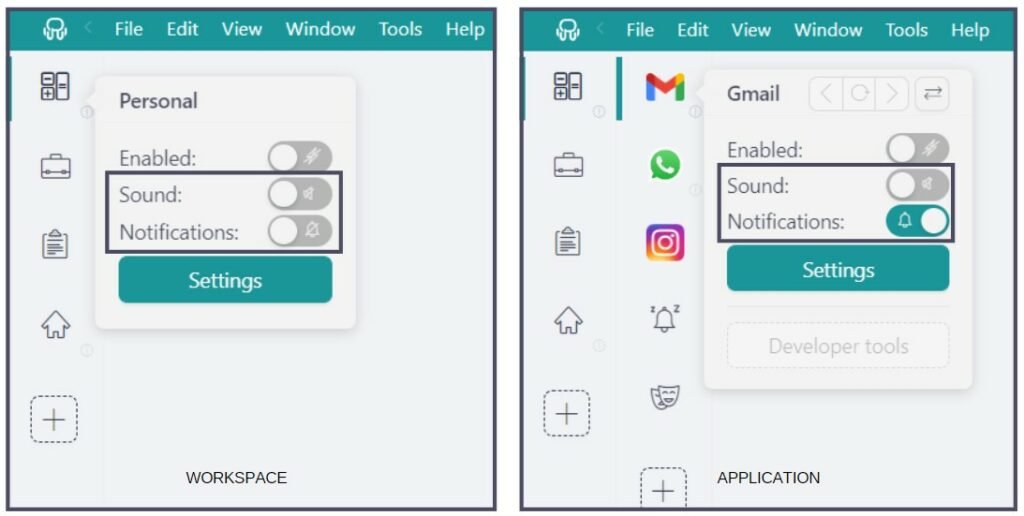
With Workspace Hub you have full control over notifications, allowing you to customize how and when you receive alerts. Whether you prefer audible notifications, no sound or turn them off completely, Workspace Hub ensures you stay focused on important tasks while minimizing distractions.
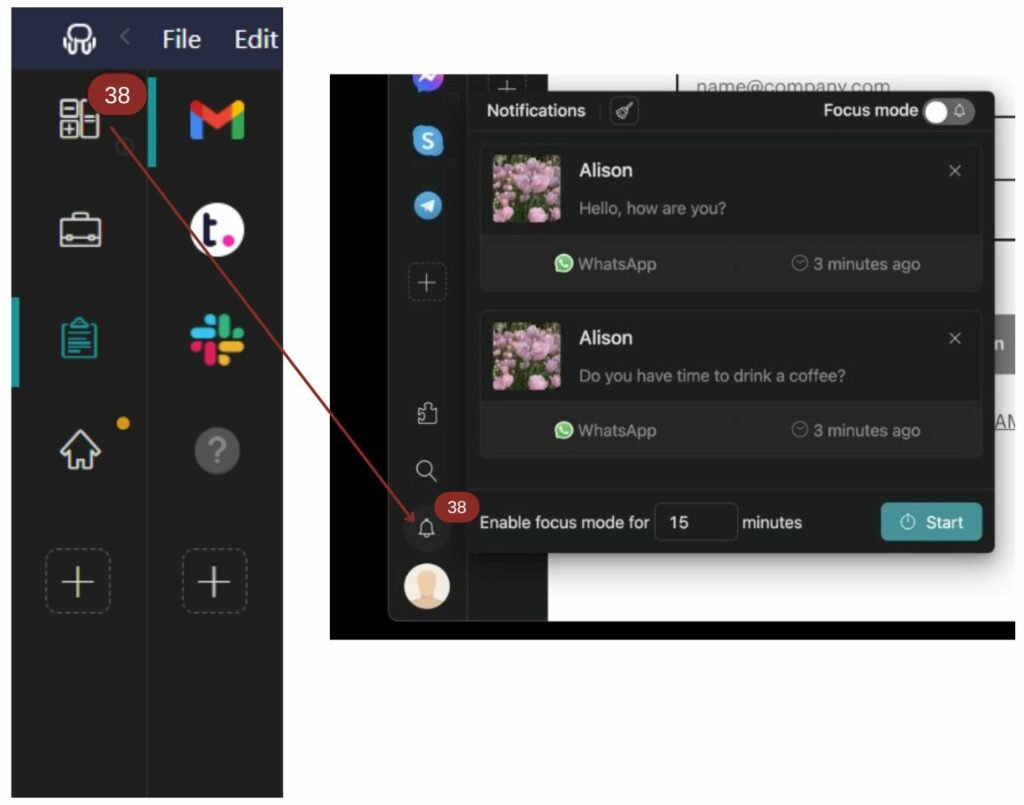
Plus, if you choose to turn off your notifications, the Notification Center serves as a centralized hub, ensuring that you never miss a critical message.
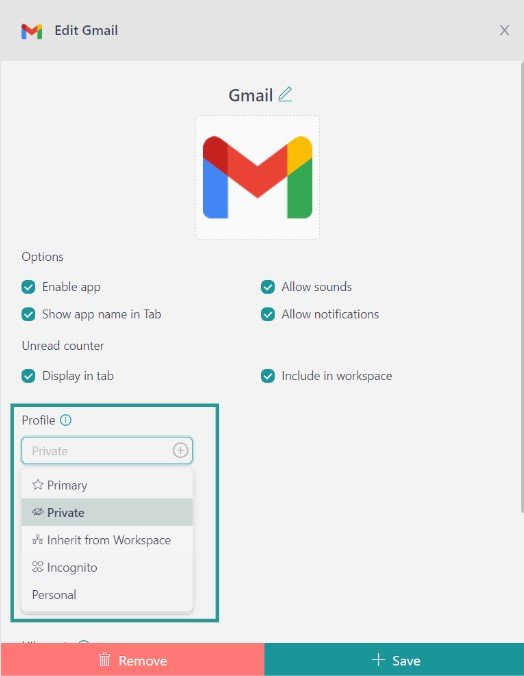
Each Profile in Workspace Hub functions as a dedicated session, providing organized management for, as an example, multiple WhatsApp accounts or different Telegram sessions. Workspace Hub offers several key profiles tailored to different needs: “Primary” for default settings, “Inherit from Workspace” for nested items, “Private” for isolated sessions, “Incognito” for enhanced privacy without storing cookies, and “Custom Profiles” for personalized configurations.
How to add these apps on Workspace Hub?
Getting started with Workspace Hub to access these apps from your desktop is a breeze. Just follow these simple steps:
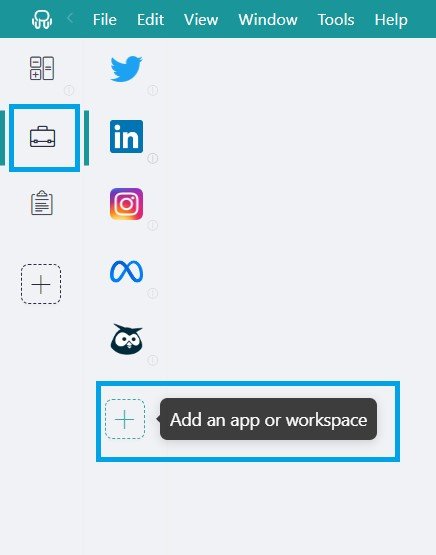
- Click on the “Add an app or workspace” button in your main tab or workspace.
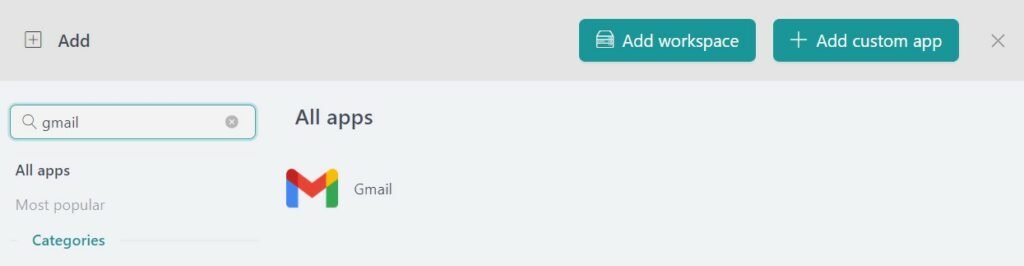
- Type the name of the app you want to add in the search panel at the left.
- Configure the application settings to your liking. Remember that you can choose which profile you want to use in the app (inherit from workspace, primary, private, incognito, or a custom profile).
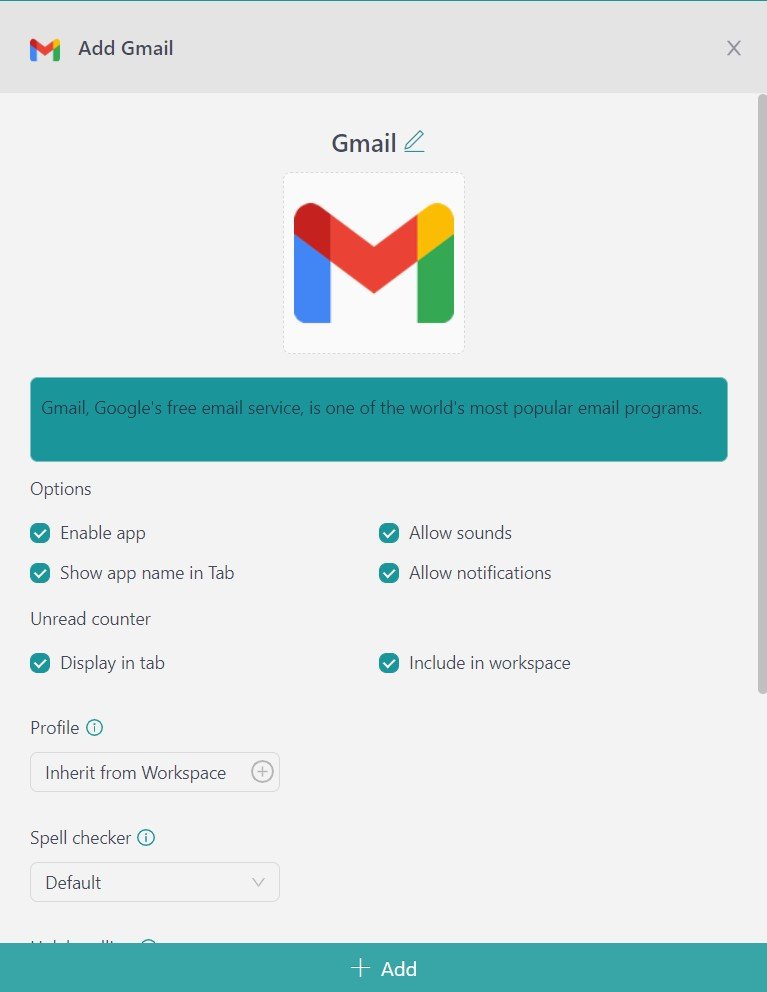
- Click on “+Add,” and that’s it! The app has been added to your Workspace Hub’s workspace!
If you are overwhelmed by the number of apps you have to manage, try Workspace Hub for free. All you have to do is download the program, configure it to your liking, and enjoy its functionalities. No cards, no cheating, it’s that simple!